
My homelab setup
Published:
The point of my homelab is replacing subscriptions. Family photos that used to live in a cloud photo service now live on a drive I own. Documents that used to mean an hour digging through a shoebox now OCR themselves into something searchable. Everything running here is cheaper, more private, or more useful than what it replaced, and usually all three.
The main node is an M2 Max MacBook Pro with 64 GB of RAM, wired into the router over USB ethernet, with a 16 TB drive plugged into the MacBook over USB. It isn’t a dedicated box. This is the same machine I write code on, do client work on, and use for everything else day to day. The homelab is one more set of terminal windows and Docker containers running alongside whatever else is open. The hardware suits the job. It’s silent under full load, it idles under ten watts where rack gear budgets hundreds, the battery doubles as a UPS, and it was already paid for. It doesn’t need to be a MacBook. A Mac mini or an old ThinkPad in a closet does the same job. The only requirement is that it’s already yours.
The usual homelab move is Proxmox, or TrueNAS, or Unraid. Wipe a machine, install a bare-metal hypervisor or NAS OS, run everything as VMs or LXC containers on top of a disk array. Those don’t fit this setup. Proxmox and ESXi have no official Apple Silicon support, and even on hardware where they’d run, installing one turns the machine into something dedicated to a rack. TrueNAS and Unraid solve a problem this setup doesn’t have. They’re built around multiple drives in a redundant array, and there’s exactly one external drive here. Docker Compose runs on top of an OS I’m already using for everything else, and that’s the appeal. The homelab rides along on a daily machine.
The main source of friction is Docker Desktop, which runs every container inside a hidden Linux VM and never talks to the kernel directly. That one design decision causes most of the problems in this post. It hides real client IPs behind a NAT gateway. It broke DNS resolution for host.docker.internal in a routine engine update. It wedges often enough to need a weekly scheduled restart. It hides named Docker volumes from the backup agent inside a disk image nothing else can see into. All of those come from Docker Desktop, none from the hardware.
A Raspberry Pi and a free ARM VM in someone else’s datacenter round out the fleet. Most of what follows is about making this hardware behave like a real server anyway, with enough of the mechanics that you could rebuild it.
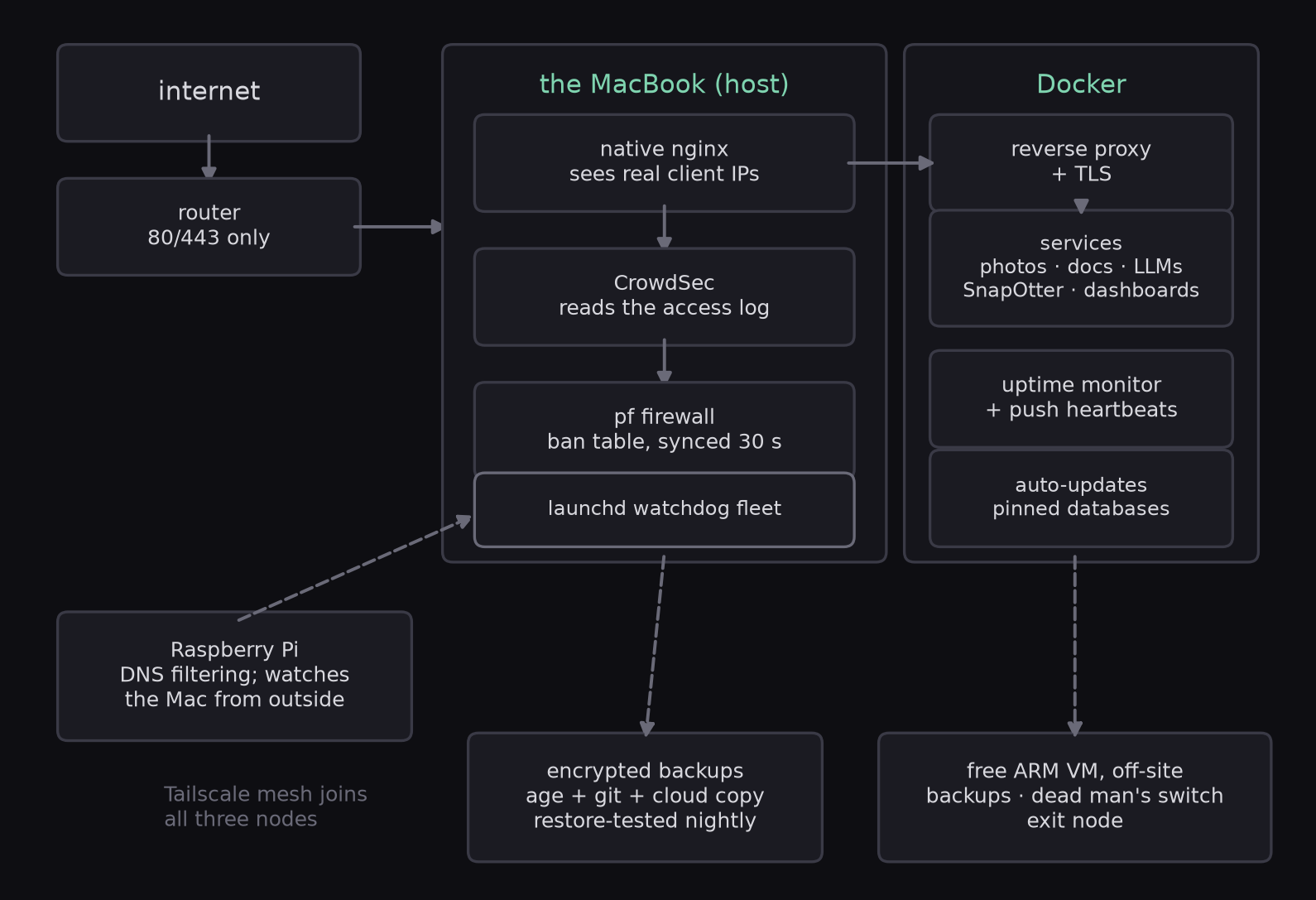
Tap or click the diagram to zoom in.
Network setup and the request path
First, the domain has to resolve to the house. The DNS records point at the home connection’s public address, and a small launchd agent on the Mac re-checks that address every five minutes and updates the records through the DNS provider’s API if it changes. Certificates come from Let’s Encrypt through the ACME DNS-01 challenge. The client asks for a wildcard certificate, Let’s Encrypt hands back a token, the client writes the token into a _acme-challenge TXT record through the same API, and Let’s Encrypt reads the record to prove control of the domain. That’s the mechanism that lets one wildcard certificate cover every subdomain without opening a port to prove anything, and it renews itself at sixty days against a ninety-day validity.
About twenty-five containers run the usual self-hosting roster plus my own work. Immich handles photos, paperless-ngx handles documents, Home Assistant runs the house, Audiobookshelf serves audiobooks, Stirling PDF does PDF tooling, Glance drives the dashboards, Open WebUI fronts a local LLM, and SnapOtter is the file-processing tool I develop and run here on my own files. Nginx Proxy Manager terminates TLS. Pi-hole, on the Raspberry Pi, filters DNS for the LAN. Tailscale carries everything administrative. It’s WireGuard underneath, each device has its own key, and an access list grants the admin tools to my own devices only, so they never need a public hostname at all. A few services are reachable from outside so family can use them, and the router forwards only what the reverse proxy needs.
The apartment’s wired network came from a builder’s oversight. The builder ran Cat5e cable to every telephone point in the unit, the same cable Ethernet needs, just terminated for a phone line. I went jack by jack and converted each telephone port into a LAN port on the same cable. The apartment now has wired Ethernet in nearly every room without a single new cable run through the walls.
An external request doesn’t go straight to Docker. This is the most macOS-specific part of the setup. Docker Desktop runs containers inside a VM and NATs every forwarded connection, so by the time a request reaches a containerized proxy, every client on earth appears to come from the same gateway address. Tooling that reads those logs to decide who to ban gets nothing useful. So a native nginx on the host owns ports 80 and 443, logs real client addresses, and forwards into Docker, where NPM does TLS and routing. Every request passes through two proxies, and each covers something the other can’t.
Docker’s own defaults needed fixing twice more. Its default address pool overlaps the private ranges home routers use, so the daemon is pinned to a range that doesn’t collide with the LAN, set through the default-address-pools key in the daemon config. A Docker engine update quietly broke host.docker.internal resolution for nginx’s resolver, so the proxy now targets the VM’s gateway address directly. I didn’t find either fix in a tutorial.
What runs on it
The services themselves are ordinary. Immich holds the family photo library, and relatives abroad use it, which is the reason anything faces the internet at all. Moving years of photos off the old cloud service was its own project: a full account export, then immich-go to walk the archive and upload everything while keeping the original timestamps and album structure, the two things a drag-and-drop re-upload would have thrown away. The export splits metadata into sidecar JSON files next to the images, and immich-go’s job is mostly matching each sidecar to its photo and writing the capture time back into the upload, since the file’s own modification time is the export date. paperless-ngx OCRs every scanned bill, form, and letter into something searchable, and “where did I put that visa paperwork from two years ago” stopped being a question. Home Assistant runs the house. Four smoke and CO alarms feed into one automation that names the room, speaks a warning aloud on both phones, and keeps repeating every 30 seconds for up to ten minutes until someone hits silence or the air clears. The camera records 30-second motion clips with a 5-second lookback and prunes itself after 30 days. The air conditioners, fans, and balcony blinds take a schedule or a voice command.
Most of the sensors behind all of that are cheap. The plugs and IR blasters are inexpensive Tuya hardware, a fraction of the cost of a name-brand equivalent, and they’ve held up fine. The smoke and CO alarms are the exception. The first round of cheap Tuya units weren’t good enough for something safety-critical, so those got replaced with a certified smoke and carbon monoxide detector, WiFi and mobile connected and interlinked between units, noticeably more expensive, and still Tuya underneath. I spent money on the safety-critical parts and went cheap on the rest.
All of it talks to Home Assistant through Tuya’s own cloud integration, which is also the officially documented path if you want to replicate this. Voice control skips Home Assistant entirely. The same devices are linked a second time, directly, through the Smart Life app into the voice assistant, because the Nabu Casa subscription that would bridge Home Assistant to it costs about eight dollars a month forever, and exposing Home Assistant to the internet just so a speaker can hear it isn’t worth it. The IR-controlled ACs need one more piece, a HACS community integration called tuya_smart_ir_ac, since neither core Home Assistant nor Tuya’s cloud API handles IR blasting natively. One path automates the house and the other answers to voice, and neither needs the other. Audiobookshelf plays audiobooks and podcasts to whichever phone is nearby. Open WebUI talks to a locally running Ollama, so asking a model a question never leaves the apartment. SnapOtter, the file-processing tool I build for a living, runs here first, on my own files, and catches most bugs before a customer does. Everything on the box is something someone in the apartment uses.
Blocking traffic with CrowdSec and pf
CrowdSec tails the native nginx logs with the nginx, base-http-scenarios, and http-cve collections, merges its findings with a community blocklist about fifteen thousand addresses deep, and publishes ban decisions on a localhost-only API. Enforcement happens at the kernel. A pf anchor holds one persistent table, and a rule drops matching traffic before any application sees it.
table <crowdsec_blocklist> persist
block drop in quick from <crowdsec_blocklist> to any
The anchor loads from its own file, so the rest of pf’s ruleset stays untouched, and quick means pf stops evaluating at the first match, so a banned address never reaches the pass rules further down. CrowdSec ships no pf bouncer for macOS, so mine is forty lines of shell on a root launchd daemon. Every thirty seconds it pulls the decision list, writes it to a file, and runs pfctl -a crowdsec -t crowdsec_blocklist -T replace -f on that file to swap the table wholesale. Wholesale replacement is the reliable option. The table always equals the current decision list, there’s no drift to reconcile, and a crashed cycle heals itself thirty seconds later. Each cycle writes the decision count to a state file, so a dead bouncer looks different from an empty list. The table usually holds a few hundred addresses.
The gap is HTTPS. Native nginx only terminates port 80. Port 443 is a raw TCP passthrough straight to NPM through nginx’s stream module, so CrowdSec’s log-based detection reads full request detail on HTTP and almost nothing on HTTPS, which is most real traffic. The fix I’m partway through is the PROXY protocol. The native layer prefixes each forwarded connection with a one-line header carrying the real client address, and NPM’s nginx is configured to read that header and log the address it finds there. Then NPM’s own access log carries real addresses, CrowdSec can tail that log, and the native layer stays a dumb TCP forwarder. As of this writing the config is written and the cutover isn’t done.
The eight-day database outage
Most of the reliability work exists because of one incident. The Immich Postgres data directory used to live on the 16 TB USB drive. The drive dropped for a moment in August, and the database corrupted. Nothing alerted, because the web app kept returning HTTP 200 while its database was dead behind it, and the outage ran eight days before a human noticed the photos were gone.
Here’s what killed the database. Postgres survives a clean power loss because it writes every change to a log before it touches the data files, and replays the log on restart. A USB drive that vanishes mid-write is different: the write fails partway, Postgres treats a failed log write as fatal, and when the drive comes back the log and the data files disagree in a way no replay can fix. The internal SSD doesn’t drop.
Every fix since came out of that. The database moved to the internal SSD, so a USB dropout now costs photo visibility and never data integrity. Uptime Kuma grew container-level monitors on a read-only Docker socket, because an HTTP check only tells you the web server is answering. And the drive got a watchdog that can remount it.
Watchdogs and self-healing
Seven launchd jobs run on short intervals, and the interesting ones fix things before they alert. They all report through the same channel: a Telegram bot hit with a plain curl call and a shared credentials file, so alerts arrive on a phone. Each is a plist with StartInterval for the loop and KeepAlive off, so a crashed watchdog doesn’t respawn in a loop of its own.
The drive watchdog checks the 16 TB mount every sixty seconds. On a dropout it attempts three remounts a minute apart, restarts the three stacks that depend on the volume, verifies their health, and only then reports the outcome. It also refuses to restart containers while the drive is absent, because starting containers against a missing mount causes a second problem.
The container watchdog does one non-obvious thing. A Docker restart: always policy revives a stopped container but reuses its cached configuration, so if a bind mount vanished, the restart fails exactly where the crash did. The watchdog instead runs docker compose up -d --force-recreate --no-deps, which rebuilds the container object and re-evaluates every mount as if fresh. Health comes from docker inspect on .State.Health.Status for containers that define a healthcheck and .State.Status for the ones that don’t. It also has a flap guard, a JSON file of heal timestamps per container: two heals per container per six hours, then one “flapping” alert and a stop. Without a give-up threshold the watchdog makes outages worse.
The simplest job is a weekly restart of Docker Desktop itself, in the early hours. Five wedges in three weeks, every one on a VM that had been up for weeks, so uptime now caps at seven days. macOS had a similar problem. The OS shipped with automatic update installs enabled, meaning it could reboot itself into a FileVault unlock screen at 3 a.m. and take the whole lab down until a human typed a password. That setting is off now, FileVault stays on, and the rare unattended reboot is a risk the external watchdogs cover.
The Raspberry Pi covers the case where the Mac goes down completely, which none of the Mac’s own watchdogs can report. It pings the Mac on a cron loop and alerts if the whole machine goes silent, and the Mac pings back every five minutes, watching the Pi the same way.
The off-site ARM VM isn’t wired in yet. It exists, it’s reachable over Tailscale, and a dead man’s switch script already runs on the Mac every five minutes waiting for somewhere to ping, but nothing points it anywhere. A full apartment power or ISP outage today takes the Pi’s alerting down with it, and nothing off-site would notice. Wiring that switch to the ARM VM is next.
Backups
The nightly job at 03:00 dumps the Immich database with pg_dumpall, tars ten named Docker volumes through throwaway Alpine containers, and snapshots the SQLite databases with sqlite3 .backup. pg_dumpall produces one plain SQL file with everything in the cluster, which a fresh container can restore from directly. The SQLite command uses the database’s own backup API, which takes a consistent copy even while writes are happening. Copying a live database file with cp gives you a corrupt backup, so the snapshot method matters as much as the schedule. Every artifact gets verified on the spot with gzip -t and tar -tzf, and the job aborts loudly if free disk drops below its floor.
Secrets and the small databases get encrypted with age before they leave the machine. age uses public-key encryption, so the backup job only holds the public key and nothing on the machine can decrypt what it produced. The encrypted files then go to a private git vault with a trick I like: git checkout --orphan, one commit, git push --force, so the repo carries tonight’s backup and no history, and stays small forever. GitHub keeps unreachable objects around for a while after a force push, which would matter for plaintext. Here every object was encrypted before it was committed, so the retention doesn’t. Oversized artifacts get slimmed to fit, including the uptime monitor’s database, which drops from hundreds of megabytes to a few once the heartbeat history tables are purged. The private age key is stored off the machine, and that’s the recovery path if the laptop itself is gone.
The vault and the nightly dump don’t cover the 16 TB of photos and documents that make the lab worth protecting in the first place. That’s Backblaze’s job, and it’s the off-site copy in the 3-2-1 backup rule, the one that would matter if the apartment itself were the thing that failed. Its Personal Backup client runs continuously in the background and covers both the internal SSD and the external drive, but it only sees ordinary files. Docker Desktop’s VM disk image is opaque to it, so a named Docker volume living inside that image never shows up in a Backblaze scan. That’s why the nightly script tars each one out to a plain file first. The Immich database dump is Backblaze’s alone to protect. At 772 MB it’s too big for the git vault’s 90 MB ceiling. Default version history is 30 days, longer than the eight days the corrupted database sat unnoticed but not by a margin I trust, so it’s extended to a year for about two dollars a month. Restoring multiple terabytes over residential fiber takes days. Backblaze’s mail-in restore option exists for that reason.
Two safeguards make the pipeline trustworthy. The job pushes a heartbeat to the uptime monitor on success, and silence for twenty-six hours raises an alert, so a broken backup gets noticed within a day. A restore-test script also loads the newest dump into a scratch container and asserts the photo count is nonzero, using the same Postgres image as production, because Immich’s vector extensions mean a generic Postgres would pass the test and fail the real restore.
Rebuilding from git
The docker-compose files in the repo are the deployment. docker compose up -d per service is the whole mechanism, tracked in git, with no drift between what’s written down and what’s running. Every service with a database declares a healthcheck, and its dependents use depends_on with condition: service_healthy, so compose waits for Postgres to answer pg_isready before Immich starts, with no fixed delays. One script, bootstrap.sh, walks a fresh machine through the rest: checks Docker is running and the drive is mounted, places the .env files from the decrypted secrets bundle, brings every service up in dependency order, restores each stateful volume from the newest backup tar if it comes up empty, and installs the launchd watchdogs. It’s idempotent, so running it twice does nothing the first run didn’t already do.
Not everything fits in a compose file. Nginx Proxy Manager, Uptime Kuma, and Home Assistant are GUI-first tools that keep their real configuration in a database or a data directory, and forcing them into full declarative config would mean fighting the tools forever for a small benefit. Home Assistant’s config directory is tracked in git directly. NPM and Kuma get their databases dumped and encrypted every night as part of the backup pipeline above. That’s restorable, if not declarative, and restorable is what matters if the Mac dies.
There’s a runbook for the full rebuild. Clone the repo, fetch the secrets bundle and the age key from where they’re kept off the machine, run bootstrap.sh, restore the Immich database from the latest dump, and the target is under two hours from a dead machine to a working one. That full drill hasn’t happened yet. What has happened, repeatedly, is restoring one service, rebuilding one container, recovering one database in isolation. Each one tested a piece of the plan.
The kiosk dashboard
An old phone mounted under the monitor runs a kiosk dashboard served by a container, which raises an obvious question: what does the dashboard show when Docker itself dies? A small stats agent runs on the host, outside Docker, a fifty-line Python HTTP server that returns CPU, memory, and disk as JSON. The kiosk page polls the agent and the dashboard container on separate timers, and when two consecutive fetches to the dashboard time out it covers the stale frame with a plain “Docker is down” banner and keeps rendering live numbers from the agent.
Day-to-day use
For the people using these services, almost none of the engineering above is visible. Family abroad opens a plain HTTPS link to see new photos. Nobody types a Tailscale key or remembers a port number. The kiosk phone needs no attention to stay current. New tiles and layout changes reach it through a 60-second data refresh, and changes to the dashboard itself propagate to the wrapper within 30 minutes. A second dashboard, Homepage, lists links and live container status for every service, so “which port was Stirling PDF on again” stopped being a question I ask myself. Audiobookshelf and Home Assistant both have real mobile apps, and most days nobody opens a browser at all.
A few things sit between fully public and fully private. The kiosk dashboard sits behind an access list in NPM, so it degrades to a login prompt. Nothing that counts as a secret (API tokens, database passwords, the age key) ever gets near a commit. Every .env and .db.env file is gitignored, and the ones that do leave the machine leave encrypted, in the vault described earlier.
The admin tools never got a public proxy host. The proxy’s own panel, the uptime monitor, Dozzle for logs, and FileBrowser are LAN and Tailscale only, and the Tailscale ACL is what enforces that. I also checked NPM’s live config against what I thought was exposed. It’s easy to leave a proxy host behind from an earlier draft of a setup, and it’s the kind of thing to check once a year.
Full list of tools
| Tool | Used for |
|---|---|
| Immich | Photo and video library, the family replacement for a cloud photo service |
| immich-go | One-time migration of an exported photo archive into Immich |
| paperless-ngx | Document management with OCR |
| Home Assistant | Home automation: smoke and CO alarms, camera, AC/fan/blind control |
| HACS | Community integrations for Home Assistant, including the IR AC controller |
| Audiobookshelf | Audiobook and podcast server |
| Stirling PDF | PDF tooling |
| Glance | The phone-mounted kiosk dashboard |
| Homepage | Second dashboard: links and live container status |
| Open WebUI | Local LLM chat front end, talks to a native Ollama install |
| SnapOtter | File-processing suite, the product I build for a living, dogfooded here |
| Nginx Proxy Manager | Reverse proxy and TLS termination inside Docker |
| CrowdSec | Log-based attack detection, community IP blocklist |
| Uptime Kuma | Uptime and health monitoring, push heartbeats |
| Dozzle | Live container log viewer |
| FileBrowser | Web-based file manager |
| Watchtower | Checks for new container images, notify-only |
| Pi-hole | Network-wide DNS and ad blocking, on the Raspberry Pi |
| Tailscale | Private mesh VPN for administrative access |
| Dynamic DNS provider | Public DNS records and the DNS-01 challenge for the wildcard TLS certificate |
| Backblaze | Continuous cloud backup of the internal SSD and the external drive |
| age | Encrypts anything that leaves the machine in a backup |
| Docker Desktop | The container runtime everything above runs inside |
| Telegram Bot API | Delivers every watchdog and backup alert to a phone |
What I learned
- Docker on macOS makes every attacker look like the gateway IP, so the first hop has to live outside Docker. That’s the reason for the native nginx and pf setup, and PROXY protocol is how the real address survives the hop into Docker.
- HTTP 200 is not health. Immich answered for eight days while its database was dead. Monitor the process and the query path, and treat a green HTTP check as the weakest signal.
restart: alwaysrestarts the container with the same broken config. Recreating the container re-evaluates mounts and config.- A watchdog needs a give-up threshold. Two heals per six hours, then alert and stop, or the watchdog becomes the problem.
- A backup without a heartbeat fails silently, and a backup you’ve never restored might not work. Test restores against the production image, because extensions make a generic database pass a test it should fail.
- Cap uptime when the evidence says so. Five Docker wedges in three weeks got a standing weekly restart, and the wedges stopped.
- A server that’s down can’t send its own alert. Every monitor needs one watcher outside its own failure domain, which is why the Raspberry Pi and the Mac watch each other. The off-site VM is meant to be the third watcher for a whole-apartment outage, and that part is still unwired.